Lab 19: Hard-Slicing an Ascend 310P3 vNPU with HAMi
This lab installs HAMi 2.10.0 and the pinned ascend-device-plugin v1.4.1 on a single Ascend 310P3. You will request fixed vNPU templates through Kubernetes resources, confirm the selected template inside a Pod, share one physical NPU between multiple Pods, and observe the scheduler's capacity and allocation accounting.
For Volcano and hami-vnpu-core soft slicing on Ascend 310P3, see Lab 13: Soft-Slicing Ascend 310P3 vNPU with Volcano and HAMi-core. This lab covers HAMi-native template-based hard slicing.
The output blocks were captured from the verified run on 2026-09-19. Node names, Pod names, IP addresses, and device UUIDs are environment-specific; compare the resource names, template names, readiness, placement, and scheduling reasons.
What You'll Learn
- install HAMi with Ascend support and deploy the pinned Ascend device plugin;
- understand the
huawei.com/Ascend310Pand-memoryresource keys; - understand how HAMi matches vNPU templates based on a Pod's memory request;
- confirm the selected vNPU through HAMi annotations, environment variables, and
npu-smi; - share one physical NPU between multiple hard-slice Pods;
- observe the seven-slice capacity limit and whole-card/slice mutual exclusion; and
- read HAMi's device-sharing and allocation metrics without confusing allocation with live workload usage.
Lab Overview
Prerequisites
- A single-node Kubernetes cluster with an idle Ascend 310P3. The verified run used Ubuntu 20.04.6 LTS, Kubernetes v1.37.0, and Ascend driver 22.0.4.
- The Ascend driver/toolkit and Ascend Docker Runtime, with an
ascendcontainerd runtime handler configured on the node. - A checkout of this website repository. Run the commands below from its root; the example files are under
tutorials/labs/examples/19-hami-ascend-vnpu-slicing/.
Running
hami-vnpu-coresoft slicing requires Ascend Driver later than 25.5.
The verified component versions were:
| Component | Version or configuration |
|---|---|
| OS | Ubuntu 20.04.6 LTS, x86_64 |
| Node | lixd-npu-test2 |
| Kubernetes | v1.37.0 |
| Ascend driver | 22.0.4 |
| HAMi | v2.10.0 |
| Ascend device plugin | v1.4.1 |
| NPU | 1 x Ascend 310P3 |
First check that the host sees a healthy device:
npu-smi info
+--------------------------------------------------------------------------------------------------------+
| npu-smi 22.0.4                                   Version: 22.0.4                                       |
+-------------------------------+-----------------+------------------------------------------------------+
| NPU     Name                  | Health          | Power(W)     Temp(C)     Hugepages-Usage(page)     |
| Chip    Device                | Bus-Id          | AICore(%)    Memory-Usage(MB)                        |
+===============================+=================+======================================================+
| 7       310P3                 | OK              | NA           28                0    / 0              |
| 0       0                     | 0000:00:07.0    | 0            1805 / 21527                            |
+-------------------------------+-----------------+------------------------------------------------------+
Step 1: Environment Setup
Deploy HAMi
Add the HAMi chart repository and install the verified chart version with Ascend support enabled:
helm repo add hami-charts https://project-hami.github.io/HAMi/
helm repo update
helm search repo hami-charts/hami --versions | head

helm install hami hami-charts/hami \
  --version 2.10.0 \
  -n kube-system \
  --set devices.ascend.enabled=true
devices.ascend.enabled=trueenables Ascend resource support.
Confirm that the scheduler started successfully:
kubectl -n kube-system get pods -l app.kubernetes.io/component=hami-scheduler
NAME                              READY   STATUS    RESTARTS   AGE
hami-scheduler-7f554bd479-rsrb9   2/2     Running   0          3m33s
Label the Node
The Ascend device plugin selects nodes through the ascend=on label:
kubectl get nodes -o wide

# Replace this value with the Ascend node shown above.
export NODE_NAME="your-ascend-node-name"
kubectl label node "$NODE_NAME" ascend=on --overwrite
Deploy RuntimeClass
The workload manifests use runtimeClassName: ascend. The Ascend node must already have Ascend Docker Runtime installed and the ascend handler registered.
Create the RuntimeClass object from the pinned device-plugin release:
kubectl apply -f https://raw.githubusercontent.com/Project-HAMi/ascend-device-plugin/refs/tags/v1.4.1/ascend-runtimeclass.yaml
Deploy ConfigMap
After HAMi is installed, the global hami-scheduler-device ConfigMap is created automatically. It contains the Ascend resource names, slicing mode, and vNPU templates; do not deploy it again.
The device plugin mounts hami-device-node-config, so create the node-level ConfigMap first:
The v1.4.1 node-config example targets
cnst-dev-w2and enableshami-vnpu-core. This lab uses template-based hard slicing; do not apply it unchanged. Set it tofalsein the node-specific configuration.
curl -fsSL \
  https://raw.githubusercontent.com/Project-HAMi/ascend-device-plugin/refs/tags/v1.4.1/ascend-device-node-configmap.yaml \
  | sed \
    -e "s/cnst-dev-w2/${NODE_NAME}/" \
    -e 's/hami-vnpu-core: true/hami-vnpu-core: false/' \
  | kubectl apply -f -
Node-level settings take precedence over the global configuration.
Deploy ascend-device-plugin
Deploy the v1.4.1 device-plugin manifest. The YAML in the v1.4.1 tag still uses the v1.4.0 image, so update the DaemonSet image explicitly:
kubectl apply -f https://raw.githubusercontent.com/Project-HAMi/ascend-device-plugin/refs/tags/v1.4.1/ascend-device-plugin.yaml
kubectl -n kube-system set image \
  daemonset/hami-ascend-device-plugin \
  device-plugin=projecthami/ascend-device-plugin:v1.4.1
Confirm that the device plugin started successfully:
kubectl -n kube-system get pod -l app.kubernetes.io/component=hami-ascend-device-plugin
NAME                              READY   STATUS    RESTARTS   AGE
hami-ascend-device-plugin-2z52v   1/1     Running   0          8m26s
After the device plugin starts, verify the node resources:
kubectl describe node "$NODE_NAME" | grep "Capacity:" -A 7
Capacity:
  cpu:                    16
  ephemeral-storage:      100676120576
  huawei.com/Ascend310P:  7
  hugepages-1Gi:          0
  hugepages-2Mi:          0
  memory:                 65866796Ki
  pods:                   110
Why does one physical card report huawei.com/Ascend310P: 7?
The
huawei.com/Ascend310P: 7value is the schedulable share calculated by HAMi/device-plugin from the smallest vNPU template; it does not mean that the node has seven physical NPUs. The smallest template in the 310P3 configuration isvir01=3072 MiB, so the calculation isfloor(21527 / 3072) = 7. The calculation usesmemoryAllocatable. The device plugin therefore reports seven virtual device shares to Kubernetes. HAMi still checks device memory and other resources when deciding whether a Pod can use the physical card.
Step 2: Inspect the 310P3 Resource Model
HAMi Resources
310P3 template hard slicing uses two resource keys: device count and memory:
resources:
  limits:
    huawei.com/Ascend310P: "1"
    huawei.com/Ascend310P-memory: "1024"
huawei.com/Ascend310P: the Ascend device-count resource. Set it to1for template hard slicing, then use-memoryto select a vNPU template.huawei.com/Ascend310P-memory: the memory request. HAMi selects the smallest template that satisfies the request.- Omitting
-memoryrequests the whole card.
Inspect Supported 310P3 Templates
Inspect the vNPU templates supported by the NPU hardware:
root@lixd-npu-test2:~# npu-smi info -t template-info -i 7
+------------------------------------------------------------------------------------------+
|NPU instance template info is:                                                            |
|Name                AICORE    Memory    AICPU     VPC            VENC           JPEGD     |
|                               GB                 PNGD           VDEC           JPEGE     |
+==========================================================================================+
|vir01               1         3         1         1              0              2         |
|                                                  0              1              1         |
+------------------------------------------------------------------------------------------+
|vir02               2         6         2         3              1              4         |
|                                                  0              3              2         |
+------------------------------------------------------------------------------------------+
|vir02_1c            2         6         1         3              0              4         |
|                                                  0              3              2         |
+------------------------------------------------------------------------------------------+
|vir04               4         12        4         6              2              8         |
|                                                  0              6              4         |
+------------------------------------------------------------------------------------------+
|vir04_3c            4         12        3         6              1              8         |
|                                                  0              6              4         |
+------------------------------------------------------------------------------------------+
|vir04_3c_ndvpp      4         12        3         0              0              0         |
|                                                  0              0              0         |
+------------------------------------------------------------------------------------------+
|vir04_4c_dvpp       4         12        4         12             3              16        |
|                                                  0              12             8         |
+------------------------------------------------------------------------------------------+
Then inspect the ConfigMap actually loaded by HAMi:
kubectl -n kube-system get cm hami-scheduler-device \
  -o jsonpath='{.data.device-config\.yaml}' \
  | grep -A24 'chipName: 310P3'
The default HAMi configuration for 310P3 enables only three templates:
| Template | Configured memory | AI Core | AI CPU |
|---|---|---|---|
vir01 | 3072 MiB | 1 | 1 |
vir02 | 6144 MiB | 2 | 2 |
vir04 | 12288 MiB | 4 | 4 |
The corresponding configuration is:
- chipName: 310P3
  commonWord: Ascend310P
  resourceName: huawei.com/Ascend310P
  resourceMemoryName: huawei.com/Ascend310P-memory
  resourceCoreName: huawei.com/Ascend310P-core
  memoryAllocatable: 21527
  memoryCapacity: 24576
  aiCore: 8
  aiCPU: 7
  runtimeClassName: ascend
  templates:
    - name: vir01
      memory: 3072
      aiCore: 1
      aiCPU: 1
    - name: vir02
      memory: 6144
      aiCore: 2
      aiCPU: 2
    - name: vir04
      memory: 12288
      aiCore: 4
      aiCPU: 4
Step 3: Run a Single Hard-Slice Pod
The first example requests 1024 MiB. That is deliberately below the smallest configured template, so HAMi should select vir01:
apiVersion: v1
kind: Pod
metadata:
  name: auto-1024
spec:
  schedulerName: hami-scheduler
  runtimeClassName: ascend
  restartPolicy: Never
  containers:
    - name: npu-test
      image: docker.io/ascendai/cann:7.0.1-310p-openeuler20.03-py3.8
      imagePullPolicy: IfNotPresent
      securityContext:
        allowPrivilegeEscalation: false
      command: ["bash", "-lc"]
      args:
        - |
          echo "ASCEND_VISIBLE_DEVICES=$ASCEND_VISIBLE_DEVICES"
          echo "ASCEND_VNPU_SPECS=$ASCEND_VNPU_SPECS"
          npu-smi info
          sleep 3600
      resources:
        limits:
          huawei.com/Ascend310P: "1"
          huawei.com/Ascend310P-memory: "1024"
The same manifest is also available as 01-single-hard-slice-pod.yaml for reuse; the inline manifest above remains the primary example in this walkthrough.
The pinned CANN image runs as root, and Step 7 installs build tools inside the retained container. Keep allowPrivilegeEscalation: false, but do not set an arbitrary non-root UID that the image does not support. If your cluster requires non-root workloads, build and validate a derivative image that already contains the tools and a user with access to the Ascend devices.
Confirm that the Pod is Running:
kubectl get pod auto-1024 -o wide
NAME        READY   STATUS    RESTARTS   AGE   IP             NODE
auto-1024   1/1     Running   0          21s   172.25.49.46   lixd-npu-test2
Inspect the allocation annotations:
kubectl get pod auto-1024 \
  -o jsonpath='{.metadata.annotations.hami\.io/Ascend310P-devices-allocated}{"\n"}{.metadata.annotations.huawei\.com/Ascend310P}{"\n"}'
E0766E64-20C0E5F1-27941064-AED8030A-F6003019,Ascend310P,3072,0:;
[{"UUID":"E0766E64-20C0E5F1-27941064-AED8030A-F6003019","temp":"vir01","memory":3072}]
The UUID is environment-specific. The important evidence is temp: vir01 and the 3072 MiB template memory. Confirm that the container receives the selected vNPU:
kubectl exec auto-1024 -- bash -lc '
  echo "ASCEND_VISIBLE_DEVICES=$ASCEND_VISIBLE_DEVICES"
  echo "ASCEND_VNPU_SPECS=$ASCEND_VNPU_SPECS"
  npu-smi info
'
ASCEND_VISIBLE_DEVICES=0
ASCEND_VNPU_SPECS=vir01
+--------------------------------------------------------------------------------------------------------+
| npu-smi 22.0.4                                   Version: 22.0.4                                       |
+-------------------------------+-----------------+------------------------------------------------------+
| NPU     Name                  | Health          | Power(W)     Temp(C)           Hugepages-Usage(page) |
| Chip    Device                | Bus-Id          | AICore(%)    Memory-Usage(MB)                        |
+===============================+=================+======================================================+
| 7       310Pvir01             | OK              | NA           28                0    / 0              |
| 0       0                     | 0000:00:07.0    | 0            249  / 2690                             |
+===============================+=================+======================================================+
The Running Pod, ASCEND_VNPU_SPECS=vir01, temp: vir01 in the allocation annotation, and 310Pvir01 inside the Pod confirm that the basic hard-slice path works.
Next, check whether HAMi selects templates based on the request. The 1024, 4096, and 7000 MiB requests do not exactly match any configured template. With the 1024 MiB Pod still running, apply the complete manifest for the other two Pods:
kubectl apply -f tutorials/labs/examples/19-hami-ascend-vnpu-slicing/02-template-matching-pods.yaml
kubectl wait \
  --for=condition=Ready \
  pod/auto-4096 pod/auto-7000 \
  --timeout=5m
kubectl get pods auto-1024 auto-4096 auto-7000 \
  -o custom-columns='NAME:.metadata.name,READY:.status.containerStatuses[0].ready,STATUS:.status.phase,NODE:.spec.nodeName'
All three Pods were Running:
NAME        READY   STATUS    NODE
auto-1024   1/1     Running   lixd-npu-test2
auto-4096   1/1     Running   lixd-npu-test2
auto-7000   1/1     Running   lixd-npu-test2
The captured matching results were:
| Original request | Webhook-adjusted request | Selected template | Container-visible memory |
|---|---|---|---|
| 1024 MiB | 3072 MiB | vir01 | 2690 MiB |
| 4096 MiB | 6144 MiB | vir02 | 5381 MiB |
| 7000 MiB | 12288 MiB | vir04 | 10763 MiB |
The 4096 MiB request appeared as vir02 inside the Pod:
ASCEND_VISIBLE_DEVICES=0
ASCEND_VNPU_SPECS=vir02
+===============================+=================+======================================================+
| 7       310Pvir02             | OK              | NA           28                0    / 0              |
| 0       0                     | 0000:00:07.0    | 0            497  / 5381                             |
+===============================+=================+======================================================+
The 7000 MiB request appeared as vir04 inside the Pod:
ASCEND_VISIBLE_DEVICES=0
ASCEND_VNPU_SPECS=vir04
+===============================+=================+======================================================+
| 7       310Pvir04             | OK              | NA           29                0    / 0              |
| 0       0                     | 0000:00:07.0    | 0            995  / 10763                            |
+===============================+=================+======================================================+
On the host, the same run showed three vNPUs on one physical device:
Run the following command on the host. This environment uses NPU ID 7 and chip ID 0; use the IDs shown by npu-smi info in your environment:
npu-smi info -t info-vnpu -i 7 -c 0
| Total number of vnpu: 3                                                       |
+-------------------------------------------------------------------------------+
|  Vnpu ID  |  Vgroup ID     |  Container ID  |  Status  |  Template Name       |
+-------------------------------------------------------------------------------+
|  100      |  0             |  ffffffffffff  |  1       |  vir01               |
|  101      |  1             |  ffffffffffff  |  1       |  vir02               |
|  102      |  2             |  ffffffffffff  |  1       |  vir04               |
+-------------------------------------------------------------------------------+
This shows that HAMi selects the smallest template that can satisfy each request.
The admission webhook also changes each Pod's memory value to that of the selected template. After creation,
kubectl get pod -o yamlshows3072/6144/12288. These configured memory values differ from the usable capacity shown bynpu-smiinside the containers because Ascend vNPU reserves some memory for itself.
Step 4: Verify Whole-Card Fallback
The largest configured 310P3 template is vir04=12288 MiB. Delete the three slice Pods, confirm that the NPU is idle, and request 13000 MiB:
The complete manifest is in tutorials/labs/examples/19-hami-ascend-vnpu-slicing/03-over-max-memory-idle-card.yaml:
kubectl delete pod auto-1024 auto-4096 auto-7000 --ignore-not-found
kubectl apply -f tutorials/labs/examples/19-hami-ascend-vnpu-slicing/03-over-max-memory-idle-card.yaml
kubectl wait --for=condition=Ready pod/over-max-memory-idle-card --timeout=5m
The Pod was scheduled and became ready:
pod/over-max-memory-idle-card created
pod/over-max-memory-idle-card condition met

NAME                        READY   STATUS    RESTARTS   AGE     IP             NODE
over-max-memory-idle-card   1/1     Running   0          3m15s   172.25.49.59   lixd-npu-test2
The API Server resources and HAMi allocation annotation show that the webhook raised the original 13000 MiB request to the full-card schedulable memory of 21527 MiB:
{
  "allocated": "E0766E64-20C0E5F1-27941064-AED8030A-F6003019,Ascend310P,21527,0:;",
  "device": "[{\"UUID\":\"E0766E64-20C0E5F1-27941064-AED8030A-F6003019\",\"memory\":21527}]",
  "resources": {
    "limits": {
      "huawei.com/Ascend310P": "1",
      "huawei.com/Ascend310P-memory": "21527"
    },
    "requests": {
      "huawei.com/Ascend310P": "1",
      "huawei.com/Ascend310P-memory": "21527"
    }
  }
}
The Pod has no ASCEND_VNPU_SPECS, and npu-smi info inside it shows the complete physical 310P3:
ASCEND_AICPU_PATH=/usr/local/Ascend/ascend-toolkit/latest
ASCEND_DOCKER_RUNTIME=True
ASCEND_HOME_PATH=/usr/local/Ascend/ascend-toolkit/latest
ASCEND_OPP_PATH=/usr/local/Ascend/ascend-toolkit/latest/opp
ASCEND_TOOLKIT_HOME=/usr/local/Ascend/ascend-toolkit/latest
ASCEND_VISIBLE_DEVICES=0
+--------------------------------------------------------------------------------------------------------+
| npu-smi 22.0.4                                   Version: 22.0.4                                       |
+-------------------------------+-----------------+------------------------------------------------------+
| NPU     Name                  | Health          | Power(W)     Temp(C)           Hugepages-Usage(page) |
| Chip    Device                | Bus-Id          | AICore(%)    Memory-Usage(MB)                        |
+===============================+=================+======================================================+
| 7       310P3                 | OK              | NA           28                0    / 0              |
| 0       0                     | 0000:00:07.0    | 0            1805 / 21527                            |
+===============================+=================+======================================================+
The host also reported Total number of vnpu: 0. The 13000 MiB request therefore did not match a larger vNPU template; it became a whole-card request. It runs on an idle card, but remains Pending with CardInsufficientMemory when slices already occupy the card.
Step 5: Verify Multi-Pod Sharing and Capacity
A single Pod only proves that the basic path works. To test the physical-card capacity, start eight identical vir01 Pods directly. The complete eight-Pod manifest is in tutorials/labs/examples/19-hami-ascend-vnpu-slicing/04-hard-slice-capacity.yaml:
kubectl delete -f tutorials/labs/examples/19-hami-ascend-vnpu-slicing/03-over-max-memory-idle-card.yaml --ignore-not-found
kubectl apply -f tutorials/labs/examples/19-hami-ascend-vnpu-slicing/04-hard-slice-capacity.yaml
kubectl get pods -l app=hami-310p-oversubscribe \
  -o custom-columns='NAME:.metadata.name,READY:.status.containerStatuses[0].ready,STATUS:.status.phase,NODE:.spec.nodeName'
A single 310P3 physical card can hold seven vir01 templates, so the expected result is seven Running Pods and one Pending Pod:
NAME                         READY   STATUS    NODE
hami-310p-oversubscribe-0    1/1     Running   lixd-npu-test2
hami-310p-oversubscribe-1    1/1     Running   lixd-npu-test2
hami-310p-oversubscribe-2    1/1     Running   lixd-npu-test2
hami-310p-oversubscribe-3    1/1     Running   lixd-npu-test2
hami-310p-oversubscribe-4    1/1     Running   lixd-npu-test2
hami-310p-oversubscribe-5    1/1     Running   lixd-npu-test2
hami-310p-oversubscribe-6    1/1     Running   lixd-npu-test2
hami-310p-oversubscribe-7    0/1     Pending   <none>
Inspect the Pending Pod's event:
kubectl describe pod \
  -l app=hami-310p-oversubscribe \
  | grep -A2 -E 'FailedScheduling|CardTimeSlicingExhausted'
  Warning  FailedScheduling  2m10s                  hami-scheduler  0/1 nodes are available: 1 1/1 CardTimeSlicingExhausted. preemption: 0/1 nodes are available: 1 No preemption victims found for incoming pod.
  Warning  FailedScheduling  2m7s (x2 over 2m7s)    hami-scheduler  0/1 nodes are available: 1 1/1 CardTimeSlicingExhausted. preemption: 0/1 nodes are available: 1 No preemption victims found for incoming pod.
  Warning  FilteringFailed   2m4s (x13 over 2m11s)  hami-scheduler  1 nodes CardTimeSlicingExhausted(lixd-npu-test2)
The host should also show seven vir01 vNPUs:
npu-smi info -t info-vnpu -i 7 -c 0
| Total number of vnpu: 7                                                       |
+-------------------------------------------------------------------------------+
|  100      |  0             |  ffffffffffff  |  1       |  vir01               |
|  101      |  0             |  ffffffffffff  |  1       |  vir01               |
|  102      |  1             |  ffffffffffff  |  1       |  vir01               |
|  103      |  1             |  ffffffffffff  |  1       |  vir01               |
|  104      |  2             |  ffffffffffff  |  1       |  vir01               |
|  105      |  2             |  ffffffffffff  |  1       |  vir01               |
|  106      |  3             |  ffffffffffff  |  1       |  vir01               |
+-------------------------------------------------------------------------------+
This verifies both that the advertised Ascend310P: 7 capacity maps to seven smallest templates and that HAMi reports CardTimeSlicingExhausted instead of placing an eighth Pod on the card.
Inspect the allocation annotations for two Running Pods to confirm that they share one physical-device UUID while using independent vir01 vNPUs:
kubectl get pod hami-310p-oversubscribe-0 \
  -o jsonpath='{.metadata.name}{"\t"}{.metadata.annotations.hami\.io/Ascend310P-devices-allocated}{"\n"}'
kubectl get pod hami-310p-oversubscribe-1 \
  -o jsonpath='{.metadata.name}{"\t"}{.metadata.annotations.hami\.io/Ascend310P-devices-allocated}{"\n"}'
hami-310p-oversubscribe-0  E0766E64-20C0E5F1-27941064-AED8030A-F6003019,Ascend310P,3072,0:;
hami-310p-oversubscribe-1  E0766E64-20C0E5F1-27941064-AED8030A-F6003019,Ascend310P,3072,0:;
The UUID is environment-specific. The important evidence is that both Pods carry the same UUID and each receives the 3072 MiB vir01 template.
Step 6: Verify Whole-Card and Slice Exclusion
Omitting huawei.com/Ascend310P-memory requests the whole card:
resources:
  limits:
    huawei.com/Ascend310P: "1"
The webhook adds the full-card schedulable memory automatically:
huawei.com/Ascend310P-memory: "21527"
The whole-card manifest is tutorials/labs/examples/19-hami-ascend-vnpu-slicing/05-whole-card-pod.yaml. Start from the capacity test, remove its eight Pods, and let the whole-card Pod run first:
kubectl delete -f tutorials/labs/examples/19-hami-ascend-vnpu-slicing/04-hard-slice-capacity.yaml --ignore-not-found
kubectl apply -f tutorials/labs/examples/19-hami-ascend-vnpu-slicing/05-whole-card-pod.yaml
kubectl wait --for=condition=Ready pod/whole-after-slices --timeout=5m
Then create the two hard-slice Pods. They remain Pending while the whole-card Pod is running:
kubectl apply -f tutorials/labs/examples/19-hami-ascend-vnpu-slicing/02-template-matching-pods.yaml
kubectl get pods auto-4096 auto-7000 \
  -o custom-columns='NAME:.metadata.name,READY:.status.containerStatuses[0].ready,STATUS:.status.phase,NODE:.spec.nodeName'
kubectl describe pod auto-4096 \
  | grep -A2 -E 'FailedScheduling|CardInsufficientMemory'
NAME        READY   STATUS    NODE
auto-4096   0/1     Pending   <none>
auto-7000   0/1     Pending   <none>

Warning  FailedScheduling  hami-scheduler
0/1 nodes are available: 1 1/1 CardInsufficientMemory.
Delete the whole-card Pod. The two slices then become Running; request the whole card again and observe the reverse direction:
kubectl delete -f tutorials/labs/examples/19-hami-ascend-vnpu-slicing/05-whole-card-pod.yaml --ignore-not-found
kubectl wait --for=condition=Ready pod/auto-4096 pod/auto-7000 --timeout=5m
kubectl apply -f tutorials/labs/examples/19-hami-ascend-vnpu-slicing/05-whole-card-pod.yaml
kubectl get pods auto-4096 auto-7000 whole-after-slices \
  -o custom-columns='NAME:.metadata.name,READY:.status.containerStatuses[0].ready,STATUS:.status.phase,NODE:.spec.nodeName'
kubectl describe pod whole-after-slices \
  | grep -A2 -E 'FailedScheduling|CardInsufficientMemory'
NAME                 READY   STATUS    NODE
auto-4096            1/1     Running   lixd-npu-test2
auto-7000            1/1     Running   lixd-npu-test2
whole-after-slices   0/1     Pending   <none>

Warning  FailedScheduling  hami-scheduler
0/1 nodes are available: 1 1/1 CardInsufficientMemory.
This confirms that whole-card requests and slices remain mutually exclusive in HAMi 2.10: the scheduler's device-memory accounting prevents both kinds of workload from using the same card simultaneously.
Remove the Pending whole-card Pod and keep the two template Pods. The next demo uses auto-7000:
kubectl delete -f tutorials/labs/examples/19-hami-ascend-vnpu-slicing/05-whole-card-pod.yaml --ignore-not-found
Step 7: Run a Real AscendC Workload in a Pod
Observe Device Memory Allocation and Release
The previous Pods only ran npu-smi and sleep, which at most shows that the devices could be created.
To verify that the vNPU can actually use device memory, use ACL to initialize the device and allocate about 6 GiB inside the retained auto-7000 Pod (vir04).
Before the run, the Pod reports:
kubectl exec auto-7000 -- bash -lc 'echo "ASCEND_VNPU_SPECS=$ASCEND_VNPU_SPECS"; npu-smi info'
| 7       310Pvir04             | OK              | NA           30                0    / 0              |
| 0       0                     | 0000:00:07.0    | 0            1138 / 10763                            |
In the first terminal, run this ACL program. It allocates twelve 512 MiB chunks, keeps them allocated for 60 seconds, and then releases them:
kubectl exec -i auto-7000 -- bash -lc 'python3 -' <<'PY'
import acl
import time

chunk = 512 * 1024 * 1024
chunks = []
print("acl.init", acl.init(), flush=True)
print("acl.rt.set_device", acl.rt.set_device(0), flush=True)
context, ret = acl.rt.create_context(0)
print("acl.rt.create_context", context, ret, flush=True)
for index in range(12):
    pointer, ret = acl.rt.malloc(chunk, 0)
    print("malloc", index + 1, "size", chunk, "ptr", pointer, "ret", ret, flush=True)
    if ret != 0:
        break
    chunks.append(pointer)
print("allocated_bytes", len(chunks) * chunk, flush=True)
time.sleep(60)
for pointer in chunks:
    print("free", pointer, acl.rt.free(pointer), flush=True)
print("destroy_context", acl.rt.destroy_context(context), flush=True)
print("reset_device", acl.rt.reset_device(0), flush=True)
print("acl.finalize", acl.finalize(), flush=True)
PY
The captured output includes allocation and cleanup after the 60-second pause. Context and pointer addresses vary between runs:
acl.init 0
acl.rt.set_device 0
acl.rt.create_context 134857936 0
malloc 1 size 536870912 ptr 20070382174208 ret 0
malloc 2 size 536870912 ptr 20071455916032 ret 0
malloc 3 size 536870912 ptr 20072529657856 ret 0
malloc 4 size 536870912 ptr 20073603399680 ret 0
malloc 5 size 536870912 ptr 20074677141504 ret 0
malloc 6 size 536870912 ptr 20075750883328 ret 0
malloc 7 size 536870912 ptr 20076824625152 ret 0
malloc 8 size 536870912 ptr 20077898366976 ret 0
malloc 9 size 536870912 ptr 20078972108800 ret 0
malloc 10 size 536870912 ptr 20080045850624 ret 0
malloc 11 size 536870912 ptr 20081119592448 ret 0
malloc 12 size 536870912 ptr 20082193334272 ret 0
allocated_bytes 6442450944
free 20070382174208 0
free 20071455916032 0
free 20072529657856 0
free 20073603399680 0
free 20074677141504 0
free 20075750883328 0
free 20076824625152 0
free 20077898366976 0
free 20078972108800 0
free 20080045850624 0
free 20081119592448 0
free 20082193334272 0
destroy_context 0
reset_device 0
acl.finalize 0
While the program is sleeping, read the live device memory from a second terminal:
kubectl exec auto-7000 -- npu-smi info -t proc-mem -i 7 -c 0
Process id:1478 Process name:python3 Process memory(B):6505803776
6505803776 B ≈ 6.06 GiB, slightly more than the 6 GiB the program requested, the rest being device context and page-alignment overhead for this process. The PID differs between runs.
If you also run npu-smi info in the container while the allocation is held, two of its numbers are easy to misread: 3092 / 3092 is the Hugepages-Usage(page) count in 2 MiB pages (3092 pages ≈ 6.04 GiB, that is this 6 GiB allocation, and it returns to 0 / 0 after release), while 10763 / 10763 is the vNPU row's Memory-Usage(MB), which is share-weighted for the slice (a vir04 slice is 4/8 of the card) and saturates at the slice total, so it does not mean the memory is fully used. The field that tracks the allocation is the host's physical-card Memory-Usage: 3296 / 21527 → 9634 / 21527 (+6.3 GiB) while it is held, and 3443 / 21527 after release.
After release, it returns to:
| 7       310Pvir04             | OK              | NA           30                0    / 0              |
| 0       0                     | 0000:00:07.0    | 0            1138 / 10763                            |
This confirms that an ACL workload can allocate and release device memory inside vir04, and that the container's device view and memory allocation are constrained by that vNPU's capacity.
Compile and Run a CANN AscendC Operator
The pinned CANN image contains an AscendC kernel sample. Install its build dependencies, copy the sample to a writable directory, and compile it for vir04:
kubectl exec auto-7000 -- bash -lc '
dnf install -y cmake make gcc gcc-c++
rm -rf /tmp/ascendc-vir04
cp -a /usr/local/Ascend/ascend-toolkit/7.0.1/tools/ascendc_kernel_sample \
  /tmp/ascendc-vir04
cd /tmp/ascendc-vir04
cmake -S . -B build \
  -DSOC_VERSION=ascend310p3vir04 \
  -DCMAKE_BUILD_TYPE=Release
cmake --build build -j"$(nproc)"
./build/main
'
The build produces AI Core object files and completes the link:
[100%] Building CXX object ... auto_gen_add_custom.cpp.o
[100%] Building CXX object ... auto_gen_matmul_custom.cpp.o
/usr/local/Ascend/ascend-toolkit/latest/compiler/ccec_compiler/bin/ld.lld -m aicorelinux ...
[100%] Built target main
The add operator output was:
output of add_custom:
8.000000 8.000000 8.000000 8.000000 ...
The matrix-multiply operator output was:
output of matmul:
8192.000000 8192.000000 8192.000000 8192.000000 ...
During repeated execution, a host sample reached 20% AICore utilization:
20:51:39.865
| 7       310P3                 | OK              | NA           34                20   / 20             |

20:51:41.424
| 7       310P3                 | OK              | NA           34                0    / 0              |
These short operator pulses prove that the task entered AI Core execution; they do not mean that vir04 continuously occupies a fixed percentage of the physical card.
Step 8: Read HAMi Allocation Metrics
The HAMi scheduler container listens on port 9395, and the Service's monitor port maps to it. In one terminal, establish a local port-forward:
kubectl -n kube-system port-forward svc/hami-scheduler 9395:monitor
In a second terminal, query the metrics while the template Pods are running:
curl -s http://127.0.0.1:9395/metrics \
  | grep -E 'hami_(gpu_shared_count|vgpu_memory_allocated_bytes|resource_quota_used)'
The following metrics are abbreviated examples; labels unrelated to this lab's verification are omitted. Refer to the actual /metrics output for the complete label set.
With the two template Pods still running, the captured run included:
hami_gpu_shared_count{
  device_type="Ascend310P",
  node="lixd-npu-test2"
} 2

hami_resource_quota_used{
  namespace="default",
  quota_name="huawei.com/Ascend310P-memory"
} 18432
Per-Pod allocation values are also available:
hami_vgpu_memory_allocated_bytes{pod="auto-4096",namespace="default"} 6.442450944e+09
hami_vgpu_memory_allocated_bytes{pod="auto-7000",namespace="default"} 1.2884901888e+10
The two byte values correspond to 6144 and 12288 MiB. They are scheduler allocation values, not the amount of memory currently touched by a workload.
The same scheduler allocation metrics can be visualized in Grafana:
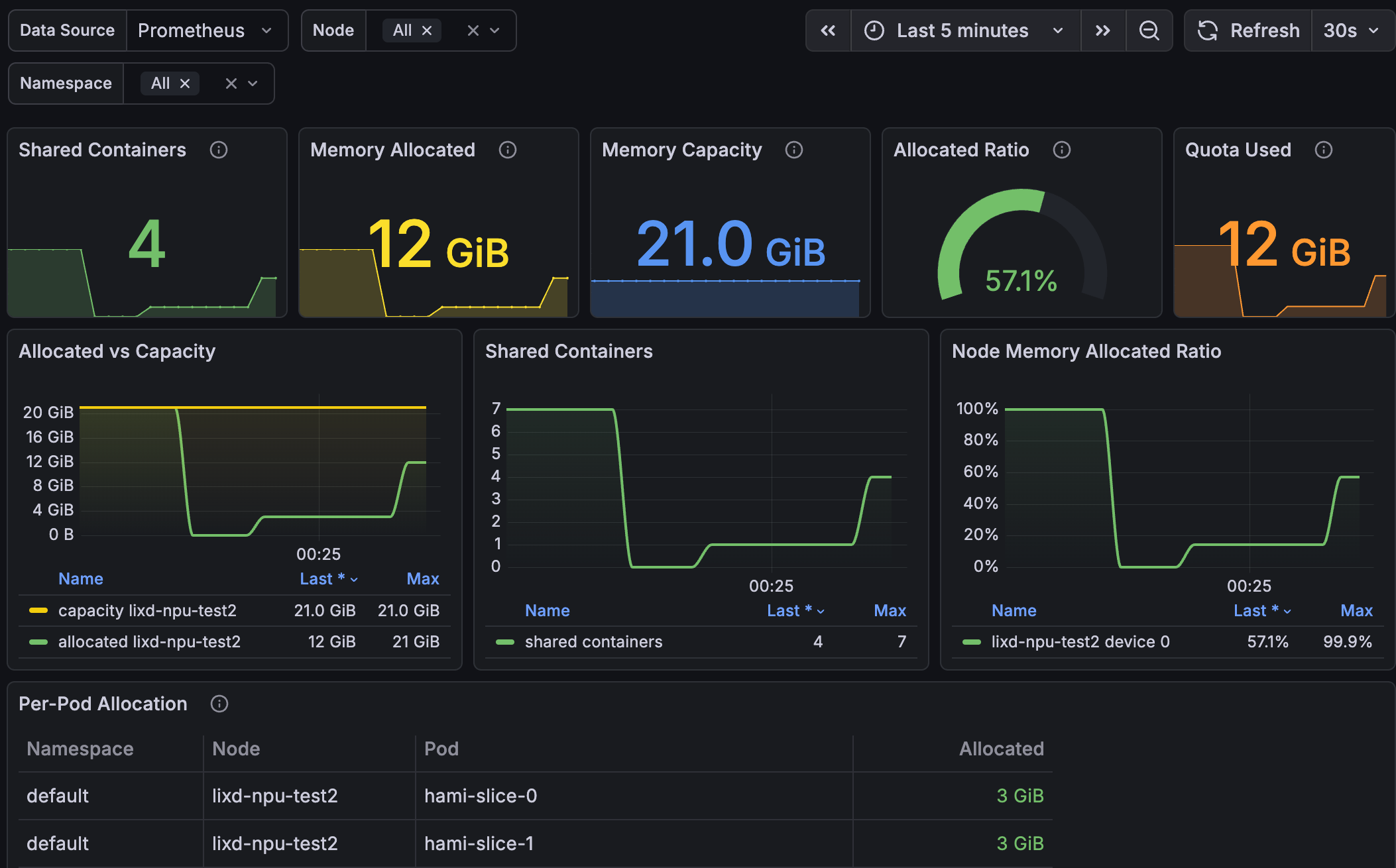
The Grafana dashboard used in this lab is available in hami-lab-dashboard.json.
Troubleshooting
The node has no huawei.com/Ascend310P allocatable resource
Check the node label, DevicePlugin, logs, and the two ConfigMaps:
kubectl get node "$NODE_NAME" --show-labels | grep 'ascend=on'
kubectl -n kube-system get pods \
  -l app.kubernetes.io/component=hami-ascend-device-plugin -o wide
kubectl -n kube-system logs ds/hami-ascend-device-plugin --tail=100
kubectl -n kube-system get cm hami-scheduler-device hami-device-node-config
A hard-slice Pod stays Pending
Check that the resource key is exactly huawei.com/Ascend310P, that the request does not exceed the configured templates or remaining card memory, and that no whole-card Pod is using the NPU:
kubectl describe pod POD_NAME
kubectl -n kube-system logs deploy/hami-scheduler --tail=100
kubectl get node "$NODE_NAME" \
  -o jsonpath='{.status.allocatable.huawei\.com/Ascend310P}{"\n"}'
CardTimeSlicingExhausted means the available template slots are full. CardInsufficientMemory commonly means a whole-card request is competing with existing slices, or the requested template cannot fit in the remaining device memory.
Cleanup
The HAMi, Ascend device-plugin, and RuntimeClass commands below remove cluster-scoped resources installed for this lab. Run them only when this lab owns the installation; on a shared cluster, delete only the Pods created by this lab and remove the node label only if this lab created it.
Delete Pods
Delete the Pods created by this lab:
kubectl delete pod -l hami.run/lab-18=true --ignore-not-found
kubectl delete pod \
  auto-1024 auto-4096 auto-7000 over-max-memory-idle-card whole-after-slices \
  --ignore-not-found
Uninstall HAMi
helm uninstall hami --namespace kube-system
Uninstall DevicePlugin
Delete the Ascend device-plugin and its node-level ConfigMap:
kubectl delete -f https://raw.githubusercontent.com/Project-HAMi/ascend-device-plugin/refs/tags/v1.4.1/ascend-device-plugin.yaml --ignore-not-found
kubectl -n kube-system delete cm hami-device-node-config --ignore-not-found
Remove Node Configuration
Remove the RuntimeClass and node label created by this lab:
kubectl delete -f https://raw.githubusercontent.com/Project-HAMi/ascend-device-plugin/refs/tags/v1.4.1/ascend-runtimeclass.yaml --ignore-not-found
kubectl label node "$NODE_NAME" ascend-
What This Lab Proved
| Check | Expected result |
|---|---|
| Plugin registration | The node advertises huawei.com/Ascend310P: 7. |
| Template matching | 1024, 4096, and 7000 MiB requests select vir01, vir02, and vir04. |
| Container device view | ASCEND_VNPU_SPECS and npu-smi report the selected template. |
| Multi-Pod sharing | Multiple Pods carry the same physical-device UUID and run as separate vir01 slices. |
| Capacity exhaustion | Seven vir01 Pods run and the eighth is Pending with CardTimeSlicingExhausted. |
| Whole-card exclusion | A whole-card request and template slices cannot consume the same physical NPU simultaneously. |
| Metrics | HAMi reports device-sharing and scheduler allocation values for the Ascend resource. |
