Scheduling
For every new Pod, the HAMi scheduler answers two questions: which node, and which card on that node. It works in two steps. It first filters for the cards that can take the Pod, then ranks them by policy and picks the best one.
Filter
A card can take the Pod when:
- it is healthy
- it has a free slot, and enough free memory and compute for the request
- it matches the card types or UUIDs the Pod asks for, if any
A container with gpucores: 100 also needs a card that nothing else uses. See Device sharing for the budgets.
To pick a card model or a specific card, use these Pod annotations:
| Pod annotation | Effect |
|---|---|
nvidia.com/use-gputype | Use only these models, for example "A100,V100" |
nvidia.com/nouse-gputype | Skip these models |
nvidia.com/use-gpuuuid | Use only the cards with these UUIDs |
nvidia.com/nouse-gpuuuid | Skip the cards with these UUIDs |
Rank
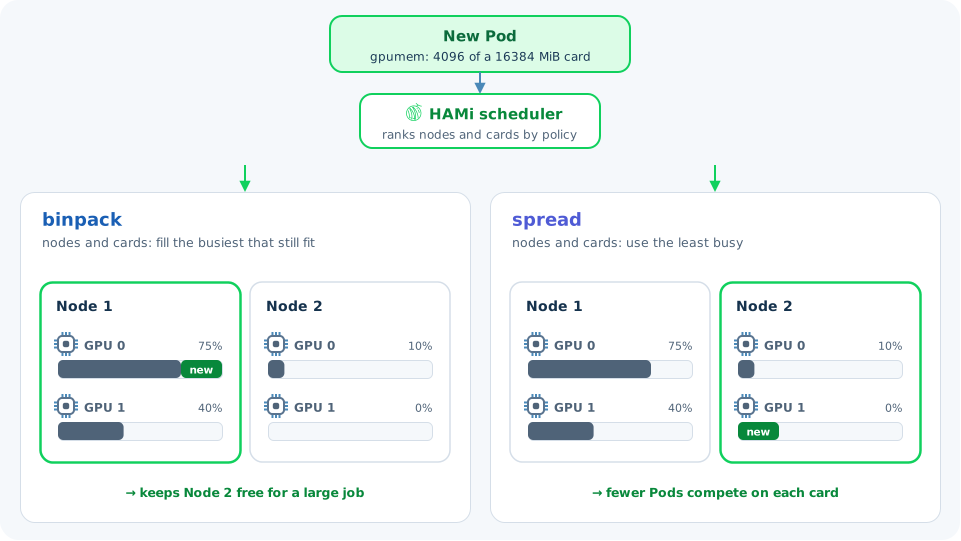
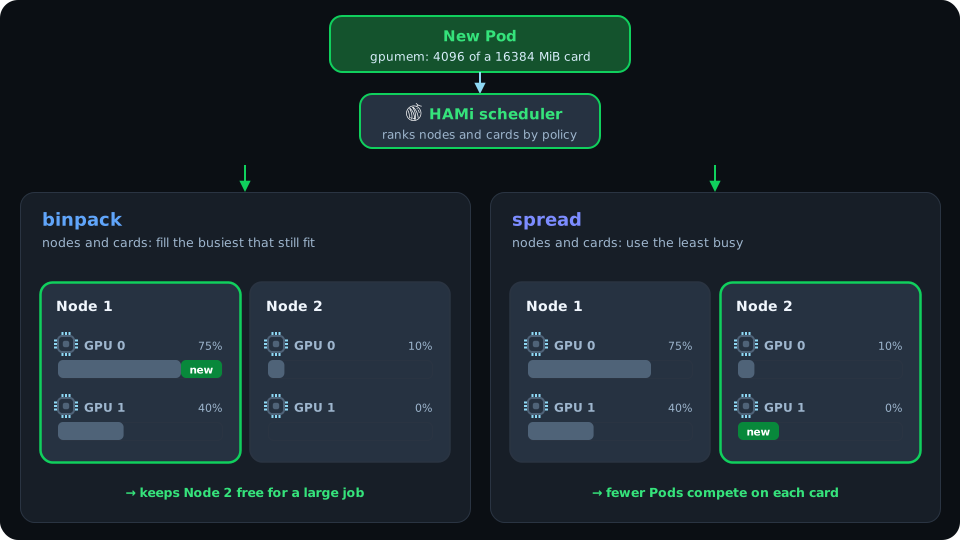
The scheduler scores each node and card by how much of its slots, memory, and compute is already in use, then picks one by policy:
- binpack picks the busiest node or card that still fits. Pods pack onto fewer cards, and whole nodes stay free for large jobs.
- spread picks the least busy one. Pods spread out, so fewer of them compete on each card.
Nodes and cards have separate policies. By default, nodes use binpack and cards use spread: HAMi fills one node before the next, and spreads Pods across the cards inside it.
Set the defaults when you install HAMi:
scheduler:
  defaultSchedulerPolicy:
    nodeSchedulerPolicy: binpack
    gpuSchedulerPolicy: spread
Override them for one Pod with annotations:
metadata:
  annotations:
    hami.io/node-scheduler-policy: spread
    hami.io/gpu-scheduler-policy: binpack
Topology-aware and mutex
Besides binpack and spread, the card policy can pick cards in two other ways:
- Topology-aware (
topology-aware): links between cards differ in speed, asnvidia-smi topo -mshows. A Pod that asks for several cards gets the set with the best links between them. A Pod that asks for one card gets the card with the weakest links to the others, which keeps the well-linked cards for multi-card jobs. Turn on topology scoring in the device plugin first. See GPU topology-aware scheduling. - Mutex (
mutex): the Pod only gets cards that no other container is using.
Learn more
- Scheduling policies with examples
- Assign to certain device type and Assign to certain device UUID
- Scheduler policy design: how the scores are calculated
