Observability
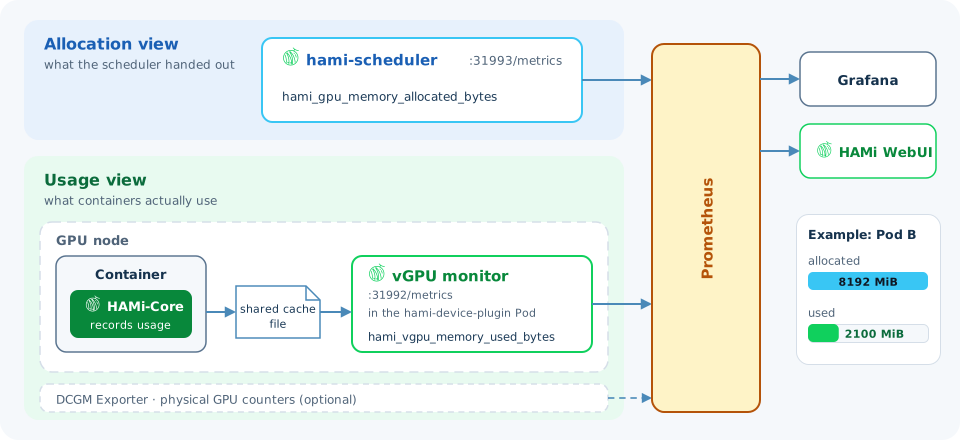
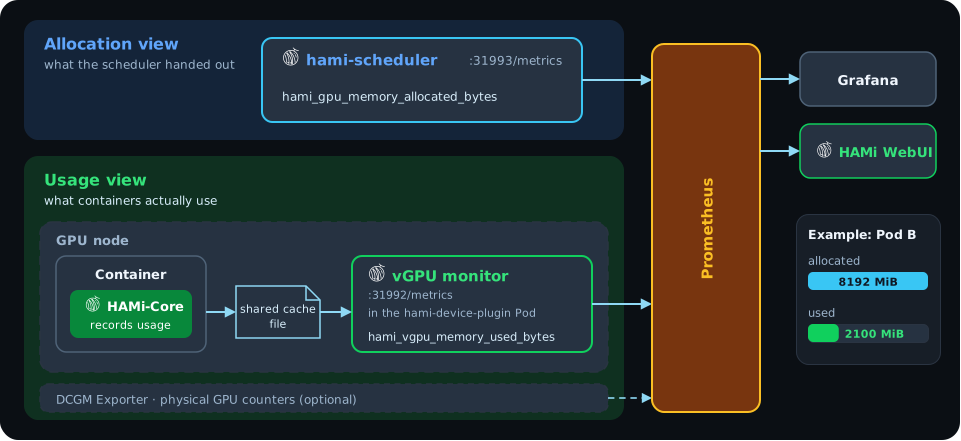
HAMi reports two views of every GPU. The allocation view shows what the scheduler has handed out. The usage view shows what containers actually use. Both are Prometheus metrics.
Allocation view
The HAMi scheduler serves allocation metrics at <scheduler-ip>:31993/metrics. They come from the scheduler's own records of which Pod holds which share.
| Metric | Shows |
|---|---|
hami_gpu_memory_allocated_bytes | Memory allocated on each card |
hami_gpu_core_allocated_ratio | Compute allocated on each card |
hami_gpu_shared_count | Number of containers sharing each card |
hami_vgpu_memory_allocated_bytes | Memory allocated to each container |
Usage view
HAMi-Core records each container's memory and compute use in a shared cache file on the node. The vGPU monitor in the hami-device-plugin Pod reads those files and serves usage metrics at <gpu-node-ip>:31992/metrics.
| Metric | Shows |
|---|---|
hami_vgpu_memory_used_bytes | Memory each container uses on a card |
hami_container_device_utilization_ratio | Compute each container uses |
hami_host_gpu_utilization_ratio | Compute used on each card, for the whole host |
hami_host_gpu_memory_used_bytes | Memory used on each card, for the whole host |
DCGM Exporter can run next to HAMi and add the card's physical counters, such as temperature and power.
Why the two views differ
A Pod that asks for 8192 MiB and loads a small model may use 2100 MiB. The allocation view counts 8192 MiB, and the usage view shows 2100 MiB. A large gap means the Pod asks for more than it needs, and the card could hold more Pods.
The gap can also go the other way. A container with CUDA_DISABLE_CONTROL=true runs without HAMi-Core and is not held to its share. The host metrics can then show more memory in use on a card than the scheduler allocated.
Dashboards
- Grafana dashboard: capacity, allocation, and usage panels for the whole cluster
- HAMi WebUI: a web console that reads the same metrics from Prometheus
Learn more
- Cluster device allocation endpoint and Real-time device usage endpoint: the full metric lists
- GPU utilization metrics: how the usage numbers are calculated
